
Jan 6
Understanding Flow Types
Contents
-
The Five Core Flow Types Every Admin Must Know
-
Other Flow Types You Should Know About
-
Choosing the Right Flow Type: Decision Guide
-
Real-World Scenarios and Solutions
-
Key Takeaways
Introduction
One of the most common questions I get from Trailblazers learning Flow is: "Which type of Flow should I use?" It's a critical question because choosing the right Flow type is your foundation - it determines what's possible, how efficiently your automation runs, and whether your solution actually solves the business problem. Choosing the wrong Flow type can lead to a whole host of problems and limitations later on.
In my years teaching Flow to thousands of Salesforce Professionals, I've noticed that understanding Flow types - not just what they are, but when and why to use each one - is often the difference between those who struggle with Flow and those who master it.
In my years teaching Flow to thousands of Salesforce Professionals, I've noticed that understanding Flow types - not just what they are, but when and why to use each one - is often the difference between those who struggle with Flow and those who master it.
We’re going to break down the different Flow types available in Salesforce. I'll explain what each type does, when you should use it, and provide real-world use cases where each Flow type shines. By the end, you'll have a clear framework for making the right choice every time you build automation.
If you want to truly master Flow - including hands-on exercises, advanced techniques, and real-world implementation strategies - take a look at the Salesforce Flow Masterclass. For now, let's build your foundational understanding of Flow types.
The Core Flow Types Every Admin Must Know
These five Flow types handle the majority of automation scenarios you'll encounter - I’d estimate around 90-95%. Master these, and you'll be equipped to solve most business requirements that come your way.
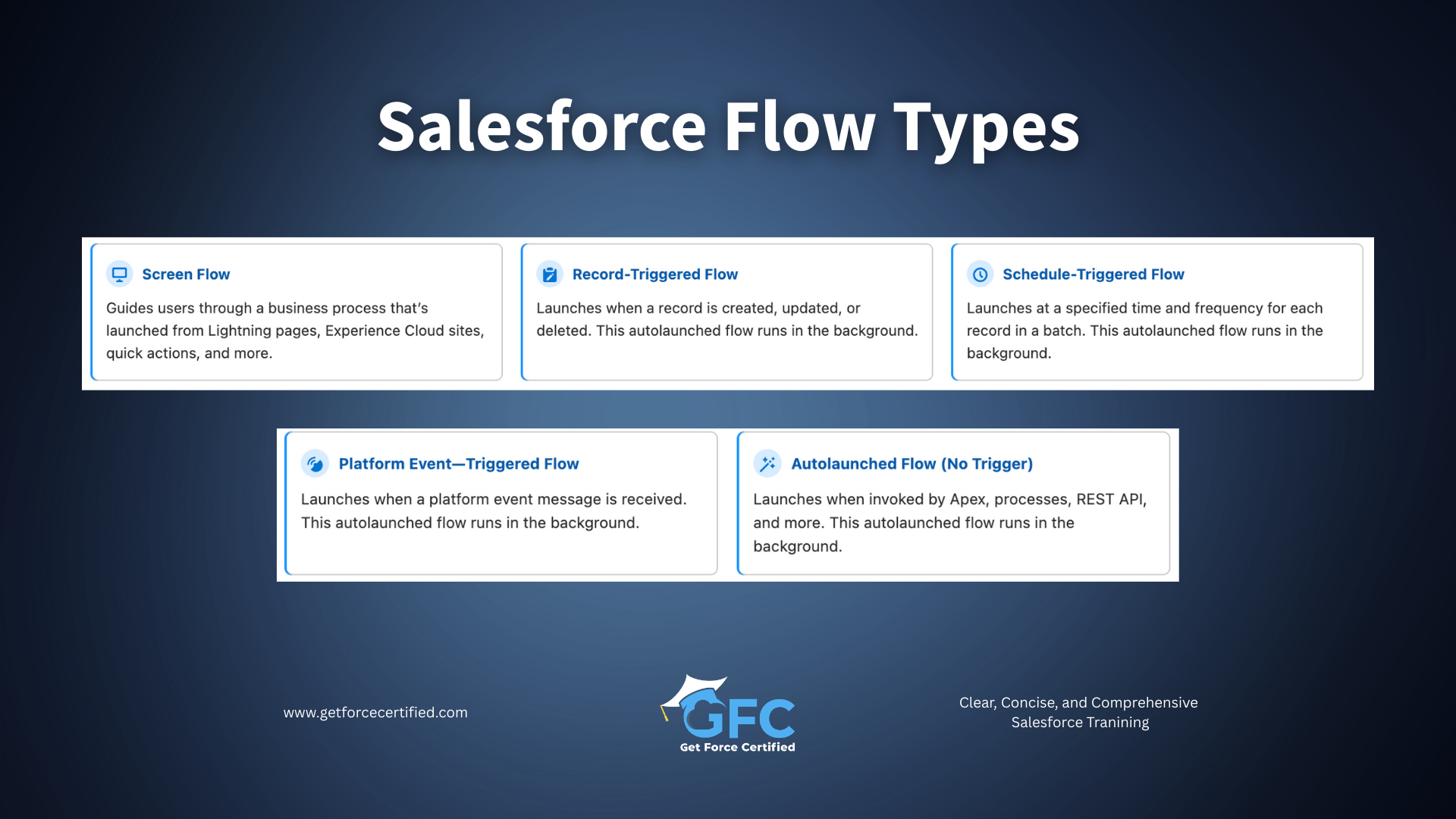
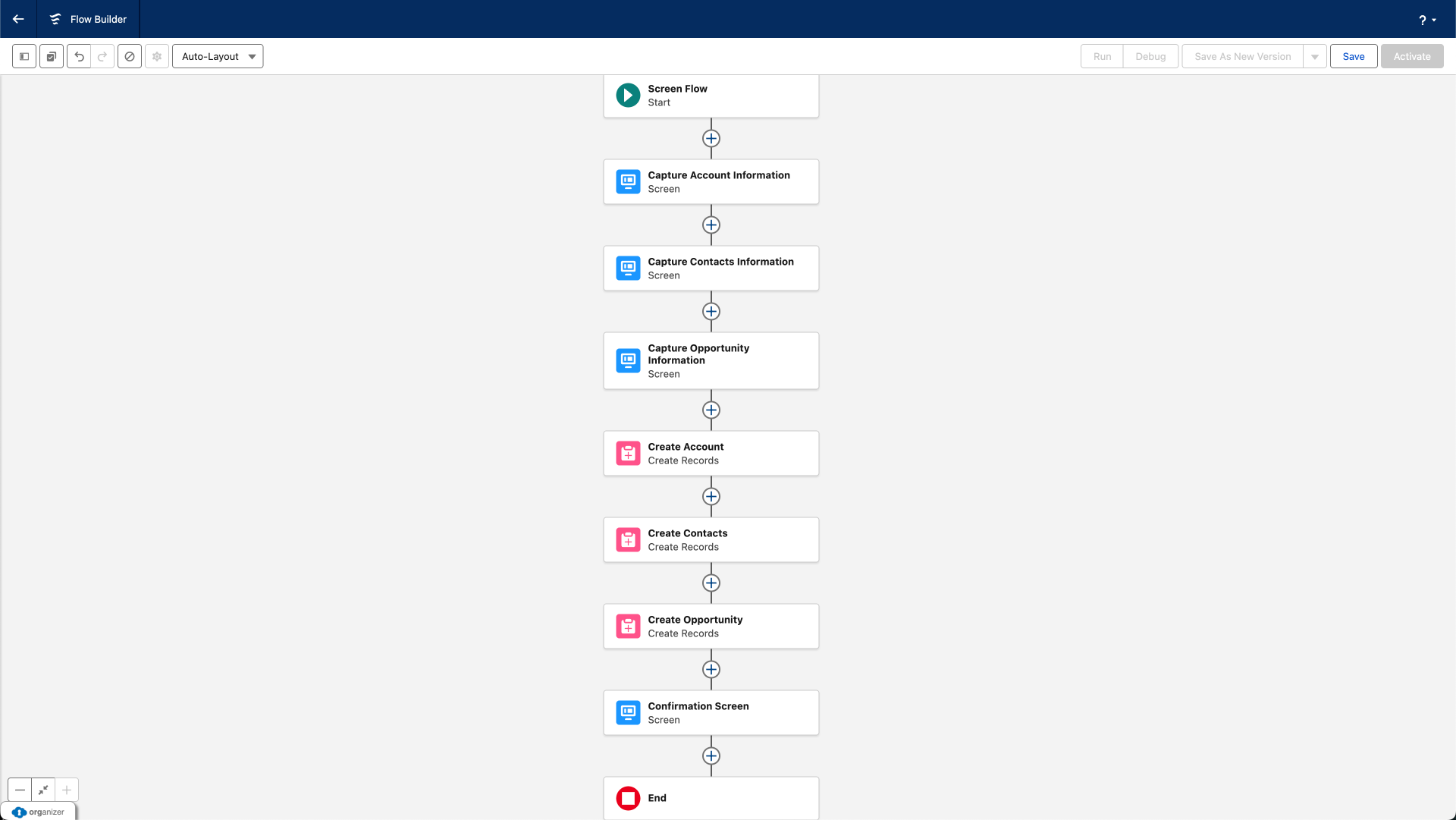
Screen Flows: Interactive User Experiences
Screen Flows are the only Flow type that directly interacts with Users through visual screens. When you need to guide someone through a process, collect information, or provide a custom interface, Screen Flows are your answer.
What Makes Screen Flows Special
Screen Flows display forms, collect User input, show dynamic information, and guide Users through multi-step processes. Unlike Record pages where Users see every field at once, Screen Flows control the experience - showing only relevant fields, providing context at each step, and preventing errors before they happen. They are a great way to streamline and simplify Salesforce processes for Users.
I've seen organizations replace clunky, confusing Record pages with streamlined screen Flows that reduce training time and eliminate common data entry mistakes. The difference is massive: instead of overwhelming Users with 50 fields and hoping they fill out the right ones, you guide them through a logical sequence that makes sense.
When to Use Screen Flows
Choose screen Flows when you need:
- Guided, multi-step processes (wizards or forms)
- Conditional field display based on User selections
- Custom data collection that doesn't fit standard page layouts
- User-facing tools or utilities
- Processes where data quality depends on getting the right information in the right order
Real-World Examples
- Customer Onboarding: Guide sales reps through collecting customer information, selecting products, and generating quotes - all in one seamless Flow
- Case Creation: Help support agents or customers log cases by asking targeted questions that populate the right fields and suggest solutions
- Custom Mass Update Tools: Let Users select multiple Records and update them in bulk through a controlled interface
- Request Forms: Employee equipment requests, PTO submissions, or expense reimbursements where structured data collection is essential
Important Considerations
Screen Flows require User interaction - they don't run automatically. You'll need to make them accessible through buttons, Lightning pages, quick actions, or utility bars. Additionally, every screen creates a new transaction, which resets certain governor limits - useful for complex processes.
Record-Triggered Flows: Automated Response to Data Changes
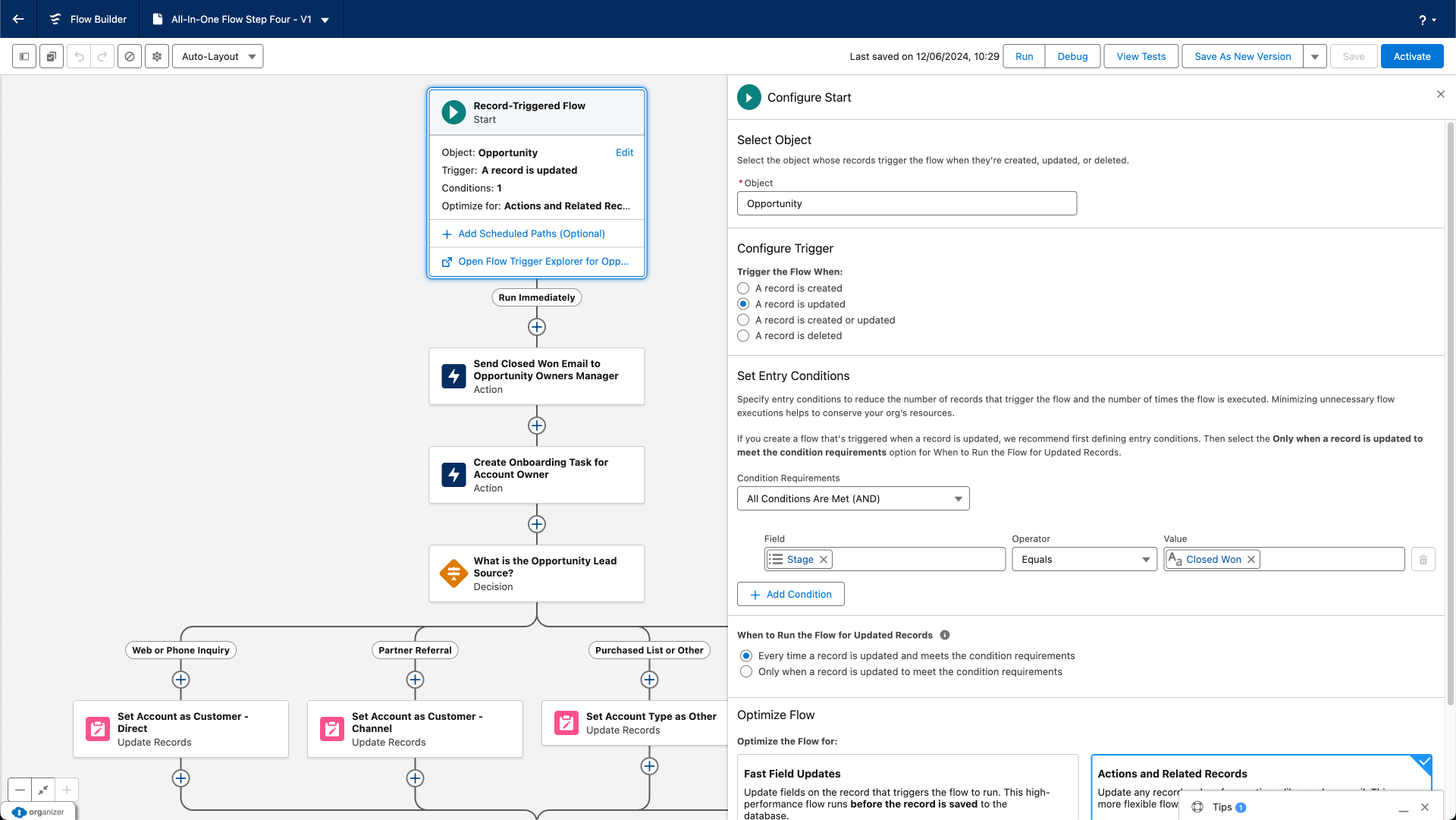
If I had to pick the most powerful and commonly used Flow type, this would be it. Record-Triggered Flows run automatically when Records are created, updated, or deleted - no User action required. I like to think of them almost as a direct replacement for Workflow Rules and Process Builders - when you move your automations from Workflow Rules and Process Builders into Flow more often than not you will be creating a Record-Triggered Flow.
What Makes Record-Triggered Flows Essential
These Flows watch your data and take action the moment something changes. Update an Opportunity to "Closed Won"? The Flow creates a Contract. Delete an Account? The Flow can notify a manager or handle cleanup tasks.
Record-Triggered Flows replaced both Workflow Rules and Process Builder, combining their capabilities with significantly more power and flexibility. If you're still using Process Builder or Workflow Rules, migrating to Record-Triggered Flows should be a priority - those tools are officially retired and no longer supported.
Record-Triggered Flows replaced both Workflow Rules and Process Builder, combining their capabilities with significantly more power and flexibility. If you're still using Process Builder or Workflow Rules, migrating to Record-Triggered Flows should be a priority - those tools are officially retired and no longer supported.
The Critical Decision: Before-Save vs After-Save
This is where many Salesforce Professionals get confused, but understanding this distinction is crucial.
Use Before-Save Record Triggered Flows when you only need to update fields on the triggering Record - calculating values, setting defaults, standardizing data formats.
After-Save Flows (Actions and Related Records) run after the Record is saved to the database. They have full functionality:
Before-Save Flows (Fast Field Updates) run before the Record commits to the database. They're approximately 10 times faster than After-Save Record Triggered Flows but have significant limitations:
- Can only update fields on the triggering Record
- Cannot create or update other Records
- Cannot send emails or perform most actions
Use Before-Save Record Triggered Flows when you only need to update fields on the triggering Record - calculating values, setting defaults, standardizing data formats.
After-Save Flows (Actions and Related Records) run after the Record is saved to the database. They have full functionality:
- Create or update any Records, including related or unrelated ones
- Send emails, post to Chatter, submit for approval
- Call Subflows and perform complex logic
- Access the Record ID for queries and relationships
Use After-Save Record Triggered Flows for everything else - any scenario involving related Records, communications, or actions beyond simple field updates.
When to Use Record-Triggered Flows
Choose Record-triggered Flows when:
- Data changes should trigger automatic actions
- You need validation beyond standard validation rules
- Related Records must be kept in sync
- Teams need notifications about important changes
- Fields need calculation or transformation based on other values
Real-World Examples
- Opportunity Management: When an Opportunity closes, automatically create a contract, notify the delivery team, and create initial project tasks.
- Data Quality: When an Account's address changes, update all related Contacts' mailing addresses to match.
- Escalation: When a Case priority changes to Critical, assign it to the escalation queue and notify the support manager.
- Field Standardization: Automatically convert product codes to uppercase or format phone numbers consistently.
Important Considerations
One mistake I see frequently: Administrators put too much logic in before-save Flows. Remember, if you need to create Records, send emails, or work with related data, you must use after-save. Don't try to force before-save to do things it can't - you'll hit walls quickly.
Also critical: always consider bulkification. Your Flow might work perfectly for one Record but fail when processing 200 Records simultaneously. Build with bulk operations in mind from the start. Think about reliability, scalability and future maintenance requirements.
Also critical: always consider bulkification. Your Flow might work perfectly for one Record but fail when processing 200 Records simultaneously. Build with bulk operations in mind from the start. Think about reliability, scalability and future maintenance requirements.
Schedule-Triggered Flows: Time-Based Automation
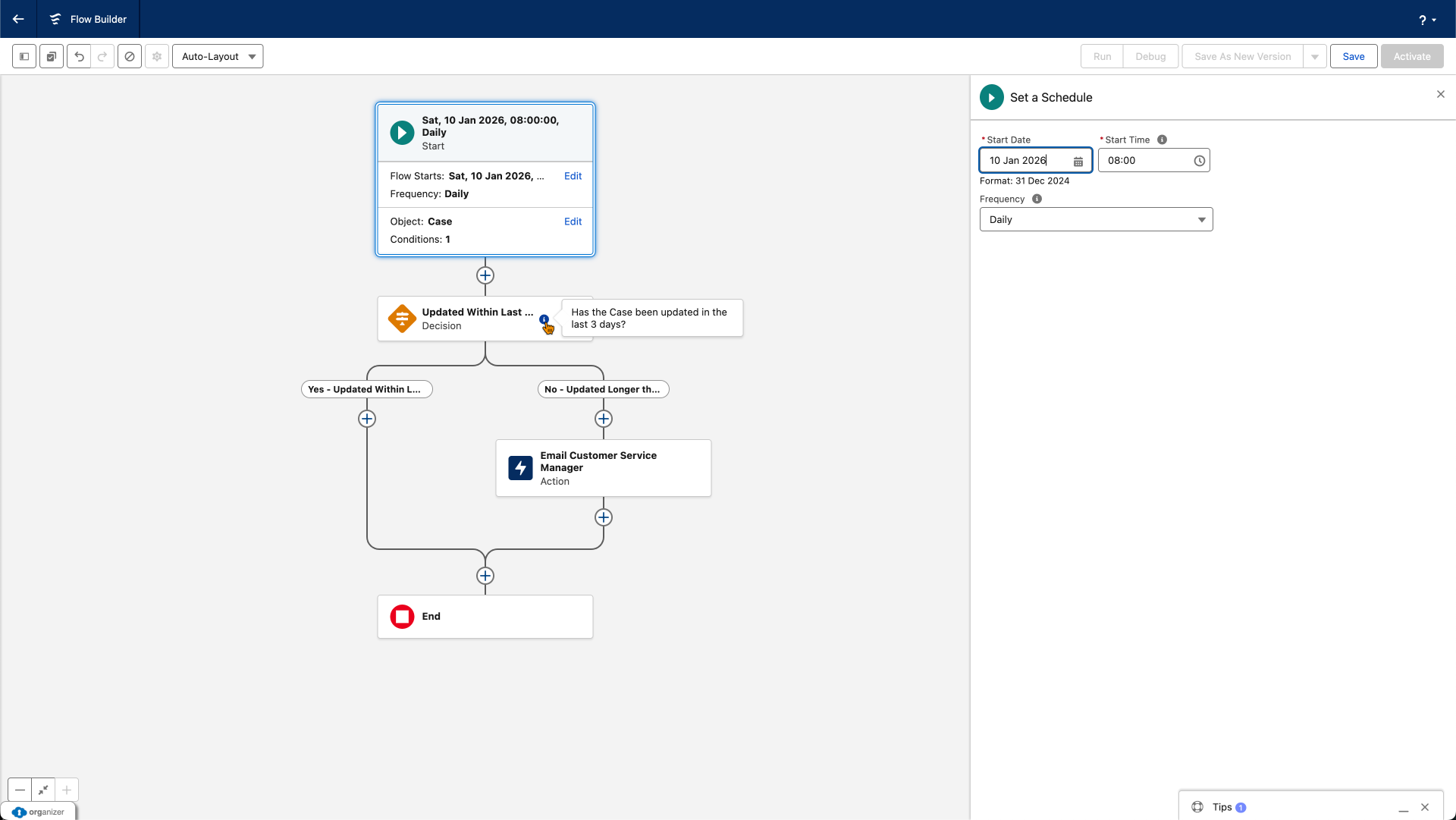
Schedule-Triggered Flows run on a schedule - daily, weekly, or at specific times - processing batches of Records that meet your criteria. Think of them as the "scheduled maintenance" of your automation.
What Makes Schedule-Triggered Flows Valuable
These Flows don't wait for data changes or User actions. They wake up at specified times, find all Records matching your conditions, and process them in batches. This makes them perfect for routine maintenance, periodic reminders, and time-sensitive updates.
Unlike Record-triggered Flows that respond to individual changes, schedule-triggered Flows handle groups of Records efficiently. You define the schedule, specify your criteria, and Salesforce handles the batch processing automatically.
Unlike Record-triggered Flows that respond to individual changes, schedule-triggered Flows handle groups of Records efficiently. You define the schedule, specify your criteria, and Salesforce handles the batch processing automatically.
When to Use Schedule-Triggered Flows
Choose schedule-triggered Flows when:
- Actions depend on dates or time passing (not data changes)
- You need periodic batch processing
- Reminders or notifications should be sent regularly
- Data cleanup or maintenance should happen routinely
- Processing should occur during off-hours
Real-World Examples
- Renewal Reminders: Every morning at 8 AM, find Accounts with Subscriptions expiring in 30 days and send renewal reminders to account managers.
- Stale Data Cleanup: Every weekend, find Opportunities unchanged for 90+ days and update their status to "Stalled".
- Weekly Reports: Every Monday, compile a summary of high-value Opportunities without activities and notify sales leadership.
- License Management: Daily check for Users who haven't logged in for 60 days and deactivate their accounts.
Important Considerations
Schedule-triggered Flows have specific limitations: they can query up to 50,000 Records and process them in batches of 200. They also count toward your daily Flow interview limits. For very large data volumes, you might need Apex batch jobs instead.
Autolaunched Flows: Reusable Background Logic
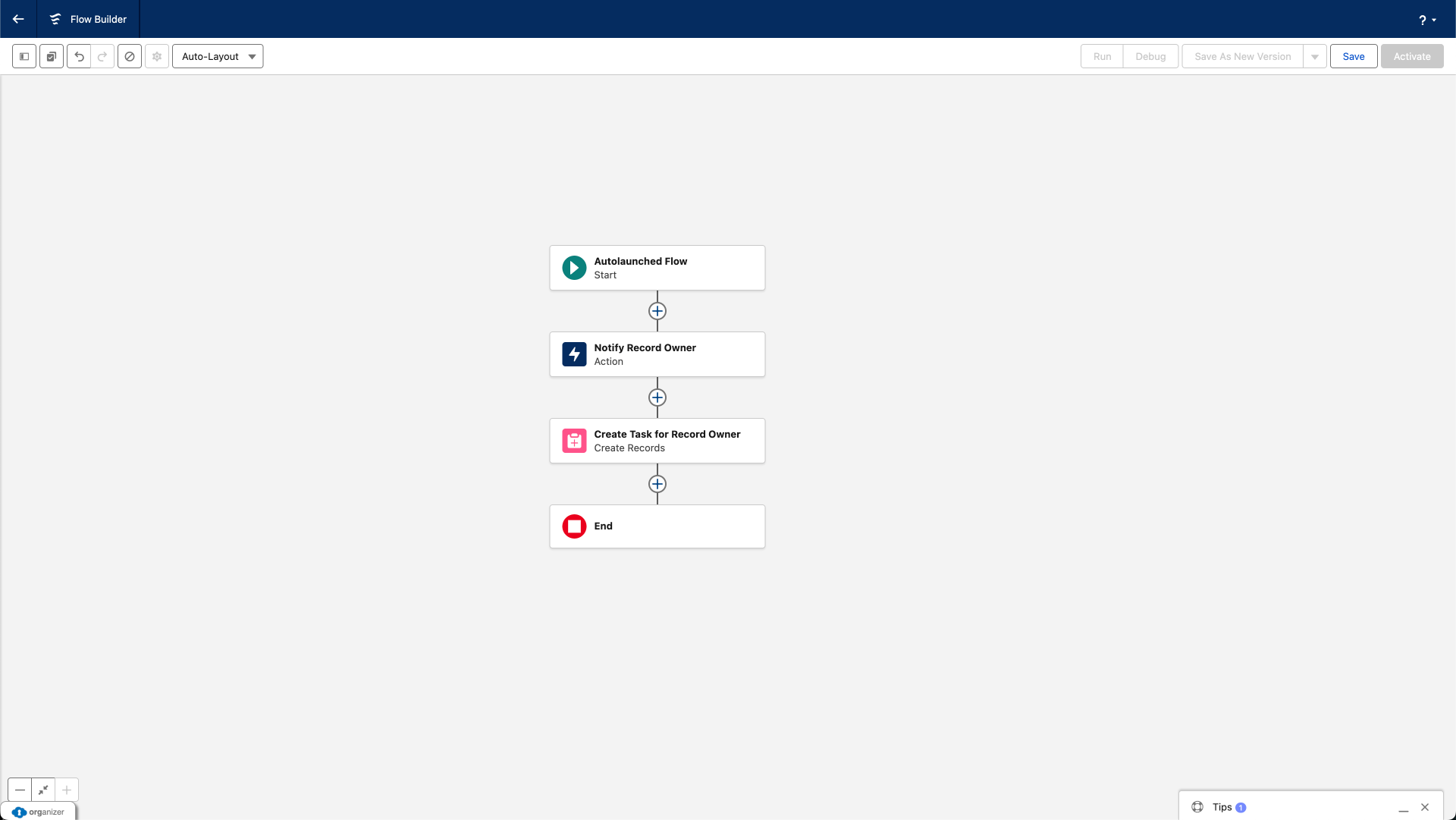
Autolaunched Flows have no trigger - they don't start on their own. Instead, they run when something else calls them: another Flow, an Apex class, a button, or an API call. This makes them incredibly versatile for creating reusable automation components.
What Makes Autolaunched Flows Powerful
The real power of Autolaunched Flows is reusability. Build your logic once, and call it from multiple places. When requirements change, update the logic in one location rather than editing multiple Flows or processes.
I've worked with organizations that had the same error handling logic copy-pasted across 15 different Flows. When the error handling process changed, they had to update 15 Flows. 1 Autolaunched Flow would have solved this problem completely meaning that only 1 Flow had to be updated, not 15!
I've worked with organizations that had the same error handling logic copy-pasted across 15 different Flows. When the error handling process changed, they had to update 15 Flows. 1 Autolaunched Flow would have solved this problem completely meaning that only 1 Flow had to be updated, not 15!
When to Use Autolaunched Flows
Choose Autolaunched Flows when:
- The same logic is needed in multiple places (Subflows)
- Complex logic should be separated into manageable components
- You're building modular, maintainable automation
Real-World Examples
- Territory Assignment Logic: One Flow contains all territory assignment rules, called by Flows handling Leads, Accounts, and Opportunities.
- Address Validation: Reusable Flow validates and standardizes addresses, called anywhere address data is collected.
- Complex Calculations: Pricing calculation Flow used by quote generation, order processing, and renewal Flows.
Important Considerations
Autolaunched Flows can accept input variables (data passed in) and return output variables (data passed back). Design these interfaces carefully - they're contracts between the Flow and its callers. Changes to input/output variables can break existing integrations.
Also, document your Autolaunched Flows thoroughly. When other Administrators are building Flows and wondering if reusable logic exists, clear documentation helps them discover and use your Autolaunched Flows rather than rebuilding the same logic.
Also, document your Autolaunched Flows thoroughly. When other Administrators are building Flows and wondering if reusable logic exists, clear documentation helps them discover and use your Autolaunched Flows rather than rebuilding the same logic.
Platform Event-Triggered Flows: Event-Driven Integration
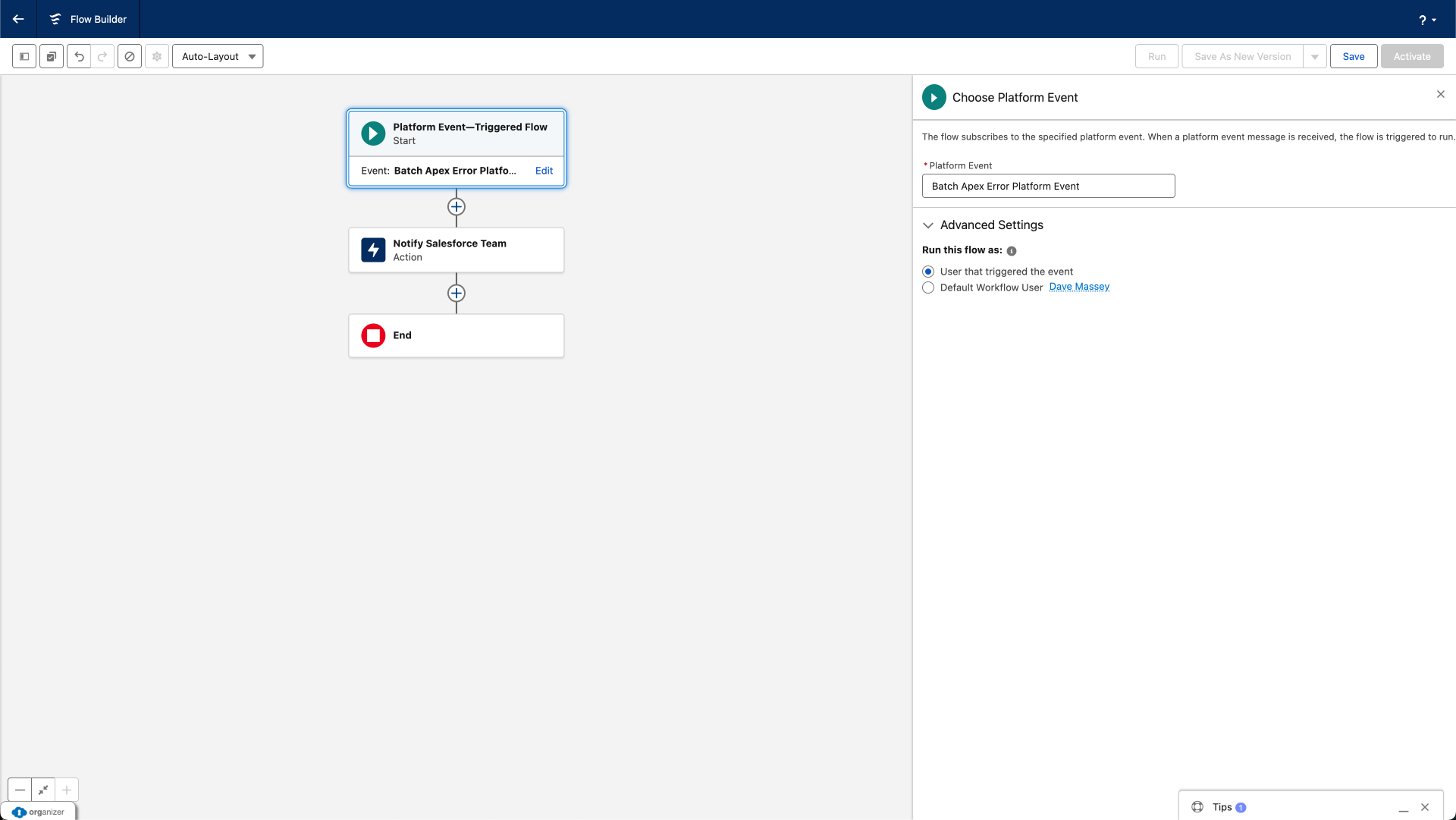
Platform Event-Triggered Flows represent the more advanced end of Flow capabilities. They subscribe to platform Events - messages published when something happens - and respond in real-time. This enables event-driven architecture and sophisticated integrations.
What Makes Platform Event-Triggered Flows Unique
Platform Events are Salesforce's publish-subscribe messaging system. Something publishes an event (the broadcaster), and subscribers receive it (the listener). Platform Event-Triggered Flows are listeners - they wait for specific events and execute when those events occur.
This enables loosely coupled integration where systems communicate through messages rather than direct calls. It's particularly valuable for IoT (Internet of Things) implementations, cross-system integration, and asynchronous processing patterns.
This enables loosely coupled integration where systems communicate through messages rather than direct calls. It's particularly valuable for IoT (Internet of Things) implementations, cross-system integration, and asynchronous processing patterns.
When to Use Platform Event-Triggered Flows
Choose platform event-triggered Flows when:
- External systems send real-time notifications to Salesforce.
- You're implementing event-driven architecture.
- Systems need asynchronous communication.
- Batch processes need to publish completion or error events.
Real-World Examples
- IoT Device Monitoring: Connected equipment publishes events when maintenance is needed; Flow creates work orders and notifies technicians.
- Integration Error Handling: Batch jobs publish error events; Flow logs them and notifies administrators
- Real-Time Inventory Updates: Warehouse system publishes inventory changes; Flow updates product availability
Important Considerations
Platform Event-Triggered Flows are definitely more advanced. Unless you're working with integrations, IoT, or complex architectures, you might not encounter them for a while. That's fine - master the other four types first. When you do need event-driven patterns, you'll know exactly where to look.
Platform Events themselves require setup - defining the event structure, publishing from source systems, and handling subscribers. This typically involves collaboration with developers or integration specialists.
Platform Events themselves require setup - defining the event structure, publishing from source systems, and handling subscribers. This typically involves collaboration with developers or integration specialists.
Ready to Build Flows Yourself?
Understanding Flow types is one thing. Building them with confidence is another.
In the Salesforce Flow Masterclass, you'll go from theory to hands-on implementation. I'll guide you through building each of these Flow types step-by-step with real business scenarios you can apply immediately.
The course includes:
Enroll in the Flow Masterclass
Let's turn this knowledge into working automation.
In the Salesforce Flow Masterclass, you'll go from theory to hands-on implementation. I'll guide you through building each of these Flow types step-by-step with real business scenarios you can apply immediately.
The course includes:
- build sessions for each Flow type
- Before-Save vs After-Save decision framework in action
- Common mistakes and how to avoid them (I've made them all so you don't have to)
- Bulkification patterns that prevent governor limit failures
- Error handling strategies that save hours of debugging
Enroll in the Flow Masterclass
Let's turn this knowledge into working automation.
Additional Flow Types You Should Know About
Beyond the five core Flow types, Salesforce offers several specialized Flow types for specific use cases. You don't need to master these immediately, but awareness helps you recognize when they might be the right solution.
Data Cloud Triggered Flows
Data Cloud triggered Flows respond to changes in Data Cloud, Salesforce's customer data platform. When data streams into Data Cloud and meets specified criteria, these Flows can execute automation in Salesforce.
When you'd use it: If your organization uses Data Cloud to unify customer data from multiple sources, these Flows let you act on that unified view - creating Cases when customer behavior indicates problems, updating Records when external data changes, or triggering Campaigns based on predictive insights.
This is enterprise-level functionality. Unless your organization has implemented Data Cloud, you won't encounter these Flows.
Approval Process Flows
Approval Flows are a modernized approach to Approval Processes, offering more flexibility than traditional Approval Process setup. They provide enhanced routing logic, dynamic approver assignment, and integration with other Flow types.
When you'd use it: For approval scenarios requiring complex logic that standard approval processes can't handle - like approver selection based on multiple criteria, multi-object approvals, or approvals integrated with larger Flow processes.
When you'd use it: For approval scenarios requiring complex logic that standard approval processes can't handle - like approver selection based on multiple criteria, multi-object approvals, or approvals integrated with larger Flow processes.
However, for straightforward approval workflows, traditional approval processes remain simpler and more maintainable. Don't overcomplicate - use approval Flows only when standard approvals truly can't meet your requirements.
Template Triggered Flows (Agentforce)
Template triggered Flows integrate with Agentforce, Salesforce's AI-powered Agents. These Flows execute when AI agents determine specific actions are needed based on conversation context or User intent.
When you'd use it: If your organization implements Agentforce for AI-powered customer service or sales interactions, template triggered Flows let AI agents trigger automation - processing returns, scheduling appointments, or updating Records based on natural language conversations.
This is cutting-edge functionality tied to Agentforce adoption. As AI agents become more common, these Flows will likely grow in importance.
Flow Orchestrator
Flow Orchestrator isn't technically a separate Flow type - it's a framework for coordinating complex, multi-step, multi-user processes. It combines multiple Screen Flows and Autolaunched Flows into stages, managing handoffs between different Users and teams.
When you'd use it: For processes requiring coordination across departments - employee onboarding (HR, IT, facilities all have steps), loan processing (applicant, underwriter, manager approvals), or complex service delivery involving multiple handoffs.
Orchestrator provides work guides showing Users their assigned steps and orchestration visibility for managers. It's sophisticated workflow management - think project coordination rather than simple automation.
The catch: Orchestrations have a usage limit. All Orgs receive 600 orchestration runs annually (resetting each year). Beyond that, orchestrations require additional licensing.
Choosing the Right Flow Type: Decision Guide
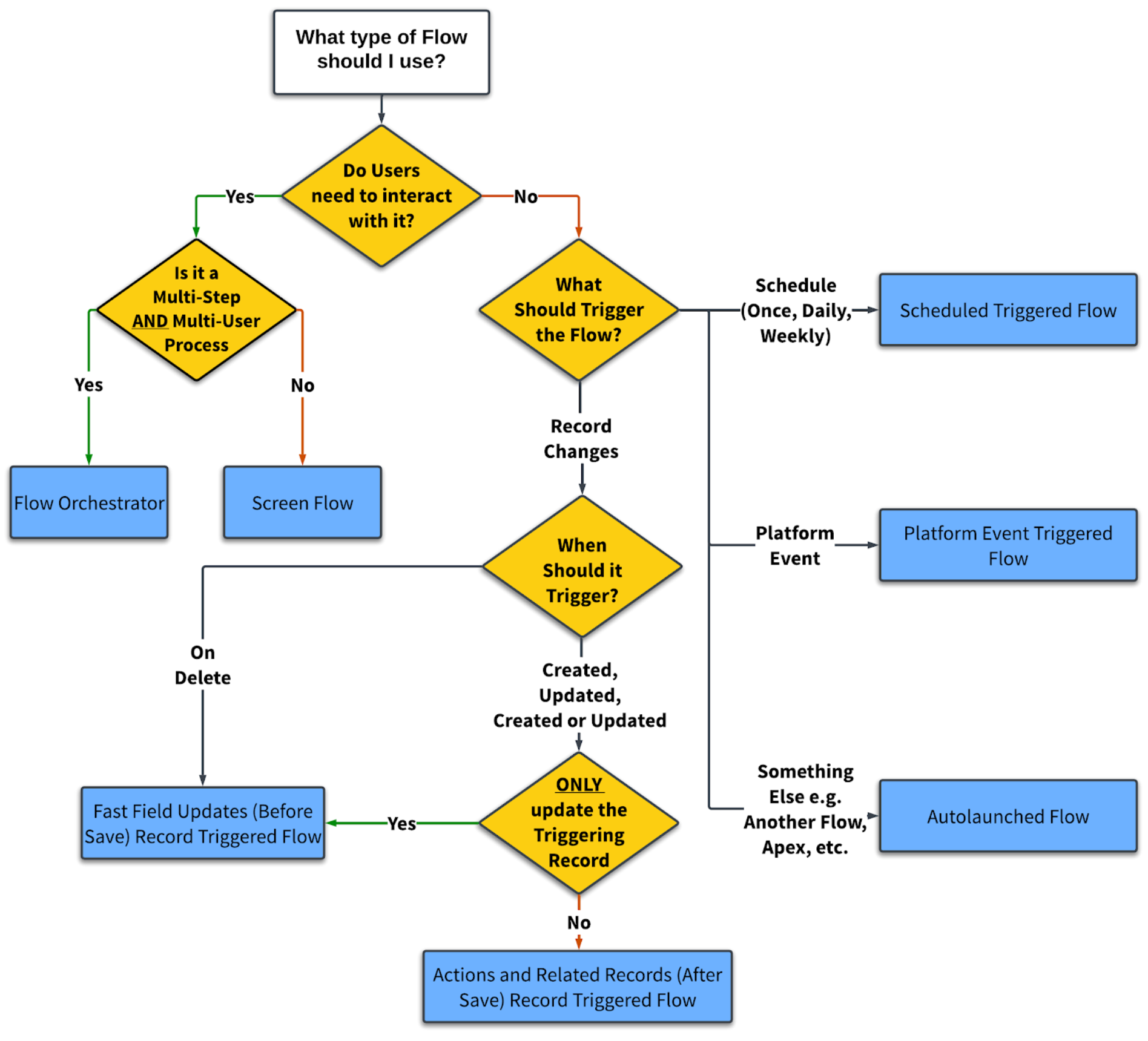
Here's a simple and practical framework for selecting the right Flow type for your automation requirements.
Decision Framework
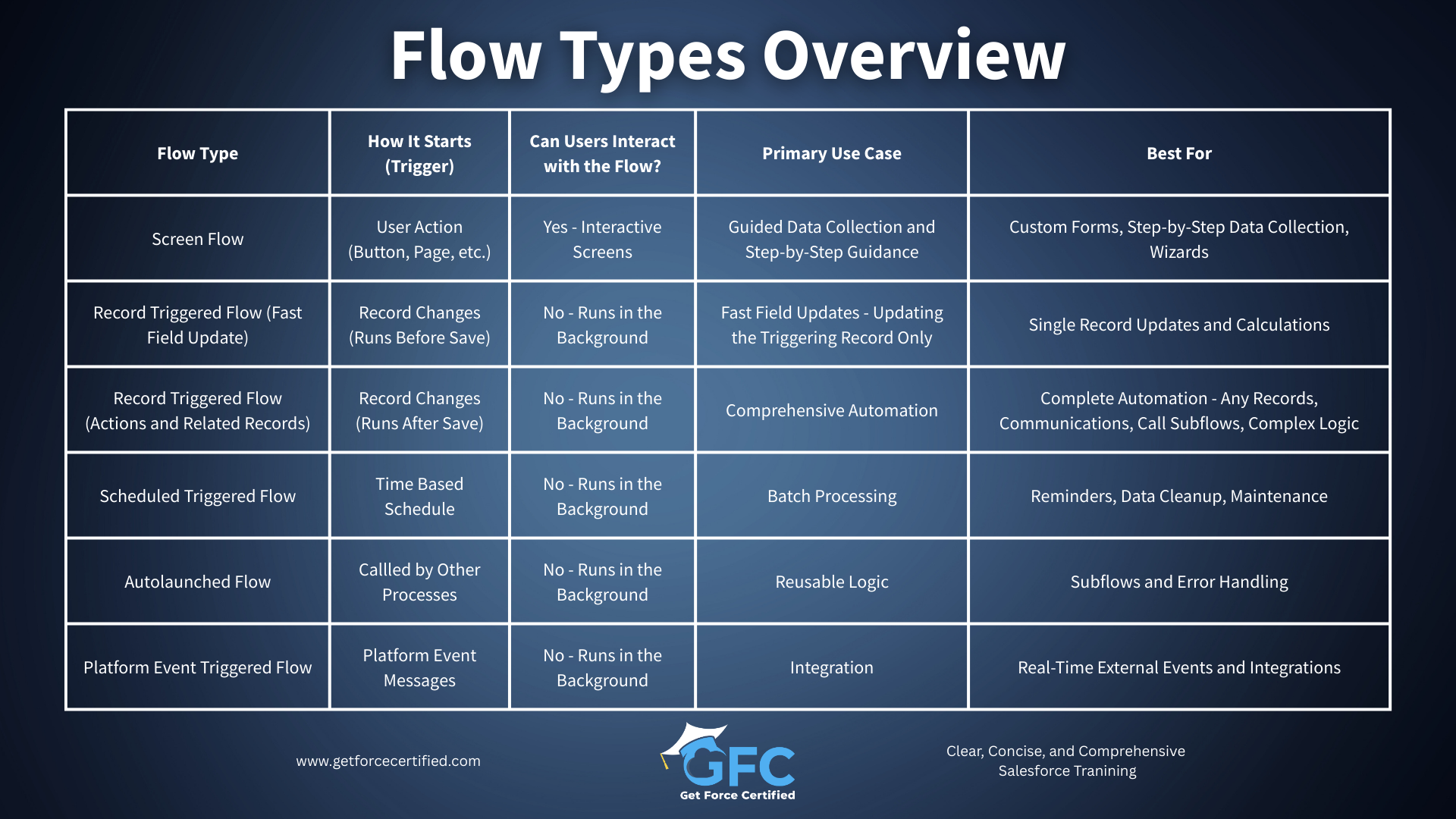
Flow Types at a Glance
Real-World Scenarios and Solutions
Let me give you some concrete scenarios and the Flow type that solves each one. This is where theory meets practice.
Scenario: "When a Case Status is updated to “Critical”, notify the manager and create a high-priority task."
Solution: Record-Triggered Flow (After-Save) on Case
Why: Responds to Record change, creates related Records, sends notifications.
Scenario: "Build a tool where Sales Reps can select multiple Opportunities and mass Update their Stage."
Solution: Screen Flow launched from a button.
Why: Requires User selection and input, interactive process.
Scenario: "When a Opportunity is Created or Updated set the Opportunity Name as the Account Name, Opportunity Type, Amount, and Close Date."
Scenario: "When a Opportunity is Created or Updated set the Opportunity Name as the Account Name, Opportunity Type, Amount, and Close Date."
Solution: Record-Triggered Flow (Before-Save) on Opportunity.
Why: Formula calculation on triggering Record only to set the Opportunity Name, no actions required.
Scenario: "When an Account's address changes, update all related Contacts and Opportunities."
Scenario: "When an Account's address changes, update all related Contacts and Opportunities."
Solution: Record-Triggered Flow (After-Save) on Account
Why: Updates related Records across multiple Objects.
Why: Updates related Records across multiple Objects.
Scenario: "External warehouse system sends inventory update events; Salesforce should update product availability."
Solution: Platform Event-Triggered Flow
Why: External system integration, event-driven.
Scenario: "Employee onboarding requires steps from HR, IT, and facilities - each with their own tasks."
Solution: Flow Orchestrator
Why: Multi-User, multi-department coordination.
Scenario: "Every Monday morning, send managers a list of their team's stalled opportunities."
Solution: Schedule-Triggered Flow running weekly.
Why: Time-based, batch processing, periodic reporting.
Taking Your Flow Skills Further
Understanding Flow types is fundamental, but it's just the beginning. Real mastery comes from hands-on experience building Flows, understanding best practices, knowing how to avoid common pitfalls, and designing solutions that scale.
In my Salesforce Flow Masterclass, I guide you through the complete journey - from your first simple Flow to advanced techniques used by expert Salesforce Professionals. You'll learn:
- Step-by-step Flow building for each Flow type with real business scenarios
- Best practices for performance, scalability, and maintainability
- Error handling and debugging techniques that save hours of frustration
- Collection processing and bulkification patterns
- Design patterns that make your Flows more powerful and easier to maintain
- Real-world case studies and implementation strategies
The course includes clear, concise and comprehensive video lessons, hands-on exercises, and resources. If you're serious about mastering Flow, I'd be honored to guide you through that journey.
Summary: Key Takeaways
-
Five Core Flow Types handle the majority of automation: Screen (User interaction), Record-Triggered (data changes), Schedule-Triggered (time-based), Autolaunched (reusable logic), and Platform Event-Triggered (event messages).
-
Before-Save vs After-Save is critical for Record-triggered Flows: use Before-Save only for updating the triggering Record's fields; use After-Save for everything else including related Records, notifications, and complex logic.
-
Screen Flows are the only interactive type that displays forms and collects User input - perfect for guided processes, custom tools, and structured data collection.
-
Flow Resources hold information your Flow uses - including Variables (temporary storage), Constants (fixed values), Formulas (calculations), Text Templates (formatted text), Choices (selection options), and Stages (progress tracking)
-
Schedule-Triggered Flows process batches based on time rather than data changes - ideal for reminders, maintenance, cleanup, and periodic processing.
-
Autolaunched Flows enable reusability by creating logic that multiple Flows, processes, or external systems can call - essential for scalable and maintainable automation.
-
Platform Event-Triggered Flows support integration by responding to event messages from external systems - advanced functionality for event-driven architecture.
-
Additional specialized types (Data Cloud, Approval, Template-Triggered, Orchestrator) address specific advanced scenarios—know they exist but master the core five first
-
The right Flow type depends on the trigger: User interaction suggests Screen, data changes suggest Record-Triggered, time suggests Schedule-Triggered, external events suggest Platform Event-Triggered, and reusability suggests Autolaunched. However there may be nuances that you need to be aware of before making your decision - there are edge cases.
-
Every Flow type serves a purpose - choosing correctly from the start prevents rebuilding later and ensures your solution performs optimally
Mastering Flow types is your foundation for building effective automation. With this knowledge, you're equipped to analyze any business requirement and select the appropriate Flow type confidently. The next step is building - start with simple Flows, gain confidence, and progressively tackle more complex automation. Every Flow you build strengthens your skills and deepens your understanding.

Copyright © 2025
Company
-
About
-
Careers
-
Team
-
Contact
Legal
-
Privacy Policy
-
Terms of Use
-
Cookie Policy